
Key Takeaways
- OCR can recognize printed characters correctly and still return the wrong business value.
- Many traditional extraction systems depend on fixed field positions, exact labels or predictable page structures.
- A document redesign can move fields, rename labels, restructure tables or add pages without changing the information the business needs.
- The most dangerous failure is not always a blank field; it may be a plausible but incorrect value that passes unnoticed.
- Reliable document automation needs contextual field identification, layout understanding, confidence scoring and exception handling.
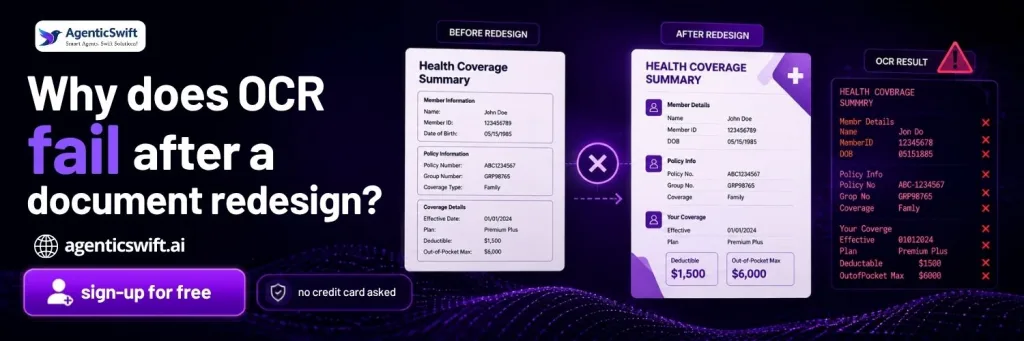
When an OCR workflow stops working after a form redesign, the first assumption is often that the OCR engine could not read the page. In many cases, the text was recognized correctly. The failure happened later because the extraction rule expected the value to appear in a particular location.
Real documents change constantly. Insurers revise policy forms. Vendors redesign invoices. Government departments update schedules. Brokers add cover pages. Legal teams append amendments. A template that worked yesterday may start missing fields even though the information is still present.
This exposes a major difference between reading a document and understanding one. Traditional OCR reads characters. A reliable document workflow must determine what those characters represent, how they relate to surrounding information and whether the extracted value is suitable for use.
Problem Scenario: The Information Has Not Disappeared—It Has Moved
An insurance team receives policy declarations from several carriers. Its existing extraction template expects the policy number in the top-right corner, the effective date beneath it and coverage limits in a table on page two.
One carrier releases a revised declaration. The policy number moves to the left side. “Effective Date” becomes “Coverage Begins.” The coverage table moves to page three because an endorsement has been inserted before it.
OCR can still read the text. However, the extraction workflow may now:
- Return a blank policy number because the expected box is empty.
- Capture a nearby account number instead of the policy number.
- Miss the effective date because the label changed.
- Read a subtotal as a coverage limit because the table structure moved.
- Process the endorsement as if it were part of the declaration.
A blank value usually creates an obvious exception. A wrong value can be more damaging because it may appear valid and move into the claims or policy system without attracting attention.
Documents That Commonly Change Layout
Insurance Documents
Policy declarations, ACORD forms, endorsements, claim forms, loss runs, broker submissions and renewal documents vary by carrier, version and jurisdiction.
Finance Documents
Invoices, purchase orders, bank statements and receipts differ across vendors and accounting systems.
Tax and Regulatory Documents
Forms, schedules and filing documents can change when regulations or reporting requirements are updated.
Legal Documents
Contracts, amendments, notices and filings contain similar concepts but rarely follow one fixed structure.
Healthcare Documents
Medical bills, explanation-of-benefits documents, intake forms and clinical records vary by provider and system.
Logistics Documents
Bills of lading, packing lists, customs declarations and delivery receipts vary by carrier, country and shipment.
Even when the document category remains the same, its visual structure can change substantially. A workflow built around one sample will struggle as variations accumulate.
How Traditional OCR and Template Extraction Work
OCR converts the visible characters in a scan or image into machine-readable text. A separate extraction layer then attempts to locate the required values.
Traditional extraction often uses rules such as:
- Read the text inside a fixed rectangle on the page.
- Capture the value immediately to the right of a known label.
- Read a particular column from a table on a specific page.
- Assume the first date is the document date.
- Expect every file to contain the same page order.
- Use the filename to decide which template should run.
These rules can work well when documents are highly standardized. The problem begins when format variation becomes normal rather than exceptional.
The Current Manual Workflow After a Template Breaks
- The document enters the OCR and template-processing workflow.
- A field is missed, captured incorrectly or assigned to the wrong field.
- The file enters a manual exception queue—or the error remains unnoticed.
- A reviewer opens the original document and searches for the correct value.
- The reviewer corrects or re-enters the information.
- A technical team investigates the failed layout.
- A new template or rule is created, tested and deployed.
- The process repeats when another issuer or document version changes.
This creates a hidden maintenance cost. The common documents appear automated, but teams continue spending time on exceptions, template updates, testing and manual correction.
How Often Is Your Team Repairing Extraction Templates?
If a new carrier, vendor or form version repeatedly sends documents to manual review, test one of those failed layouts with AgenticSwift. The goal is to determine which fields can be identified from meaning and context rather than from one fixed position.
The Automated Workflow for Changing Layouts
- Receive documents through upload, email, folder, portal, scanner, FTP connection or API.
- Identify the document type using content and context rather than filename alone.
- Recognize printed and handwritten content using OCR and ICR where appropriate.
- Use computer vision to understand page regions, tables, checkboxes, signatures and spatial relationships.
- Identify required fields using labels, context, expected patterns and document meaning.
- Apply validation checks and confidence thresholds.
- Send uncertain fields for focused human review.
- Deliver approved data to the required business system.
The key difference is that the business field is separated from one fixed location. The workflow looks for the policy number as a policy number, not merely as text inside a predefined rectangle.
Where Conventional OCR Fails When Layouts Change
Fixed Coordinates Lose Their Target
A coordinate rule cannot follow a field when it moves to another part of the page or a different page altogether.
Labels Change While the Meaning Remains
“Policy Number,” “Policy No.” and “Contract Reference” may serve the same purpose. A literal rule can treat them as unrelated.
Tables Are Reorganized
Columns may change order, headings may span several rows or a table may continue across pages. OCR can recognize the cell text while losing the relationships required to rebuild the table.
Pages Are Added, Removed or Reordered
Cover sheets, instructions, endorsements and attachments change where important information appears.
Several Documents Arrive in One PDF
A claim package may contain a form, estimate, police report and handwritten statement. OCR can read the pages but cannot automatically decide where one document ends and another begins.
Scanning Changes the Apparent Position
Rotation, skew, cropping, shadows and inconsistent resolution can shift a field away from the coordinates expected by the template.
Handwritten Notes Alter the Page
Annotations may cover printed labels, add exceptions or introduce new values that did not exist in the original template.
Incorrect Values Can Look Plausible
A nearby date, account number or total may satisfy a basic pattern check. Without context and confidence scoring, it can pass silently.
How AgenticSwift Approaches Changing Document Layouts
AgenticSwift’s AI Doc Parser uses several document signals together. OCR reads printed content, ICR supports handwriting, computer vision identifies visual structure and natural language processing helps determine what the values mean.
Rather than relying exclusively on coordinates, the parser can use labels, surrounding language, document type, layout relationships and expected field patterns. This makes it possible to search for the correct business value within a revised structure.
The approach is designed to adapt to layout variations at runtime without requiring a separate model-retraining cycle for every document redesign. When confidence is lower, the affected field can be sent for review instead of treating the entire file as a failure.
New target fields, validation rules, languages and system integrations still need to be defined and tested. Adaptive extraction reduces dependence on brittle templates; it does not remove the need for clear business requirements.
Traditional Template-Based OCR
- Document arrives.
- OCR reads the text.
- Rule checks a fixed location.
- The layout changes.
- The field is missed or the wrong value is captured.
- The file goes to manual review.
Adaptive Document Processing
- Document arrives.
- The document type and layout are identified.
- Printed and handwritten content is recognized.
- The field is located using meaning, labels and context.
- Confidence and validation checks are applied.
- Only uncertain values are reviewed.
- Approved data moves to the next system.
Example of an Extracted Result After a Layout Change
A revised policy declaration may produce the following business-ready result:
- Document type: Policy declaration
- Layout: Previously unseen variation
- Policy number: PL-782451
- Effective date: August 1, 2026
- Coverage limit: $500,000
- Review status: Coverage limit requires confirmation because confidence is below the approved threshold
- Output destination: Policy administration review queue
This example is illustrative. The actual fields, thresholds and destinations should be configured for the workflow being automated.
Practical Evaluation Criteria
Test Several Layouts of the Same Document Type
Use documents from different issuers, versions, regions and time periods. One template cannot demonstrate adaptability.
Include Difficult Files
Test poor scans, mobile photographs, handwriting, multi-page tables, annotations and combined PDFs.
Measure Field-Level Accuracy
Review critical dates, identifiers, monetary values and limits separately. A document-level pass rate can hide serious field errors.
Measure Incorrect Captures as Well as Missing Fields
A blank value is easy to identify. A plausible but incorrect value may create greater operational risk.
Track the Human-Review Rate
Measure how many documents and individual fields require attention. Sending every changed layout to a reviewer is not meaningful automation.
Check Source Traceability
Reviewers should be able to connect an extracted value to its source and understand why it was flagged.
Test Unseen Layouts
Hold back several document variations during setup and introduce them later. This provides a better view of how the workflow handles new structures.
Confirm Integration Behaviour
Define how approved and corrected values reach the ERP, CRM, claims, policy, database or review system.
When Fixed-Template OCR May Still Be Appropriate
Traditional OCR and fixed templates may still be suitable when:
- The document is generated internally and its layout is strictly controlled.
- The format rarely changes.
- Only a small number of fields are required.
- The consequences of an extraction error are limited.
- Every file already receives a full manual review.
- Document volume does not justify a broader automation platform.
Adaptive document processing becomes more valuable as the number of issuers, layouts, languages, handwritten fields and downstream risks increases.

Frequently Asked Questions
Why does OCR fail after a document redesign?
OCR may still recognize the characters, but the extraction rule can fail when fields, labels, tables or pages move away from the expected positions.
Can a traditional OCR system support multiple layouts?
Yes. Separate templates and rules can be created for different layouts. The challenge is the maintenance effort required as new versions and exceptions continue to appear.
What is layout-aware document processing?
It uses visual structure and context to identify page regions, labels, tables and field relationships instead of treating the document as a flat stream of text.
Does adaptive extraction eliminate human review?
No. Low-confidence or inconsistent fields should still be reviewed. The objective is focused exception handling rather than rechecking every document.
Does every new layout require model retraining?
Not necessarily. An adaptive parser can handle many layout variations at runtime. New fields, rules, languages or business requirements may still require configuration and testing.
How should layout adaptability be tested?
Use several versions of the same document type, include difficult files, hold back unseen layouts and measure field-level accuracy and review rate.
Stop Rebuilding Templates for Every Document Variation
The most useful document test is not the cleanest sample. It is the layout that currently breaks your workflow. Bring AgenticSwift a difficult policy, claim, invoice, contract or form and evaluate how the required fields, uncertainty and structured output can be handled.